ZHIQIAN
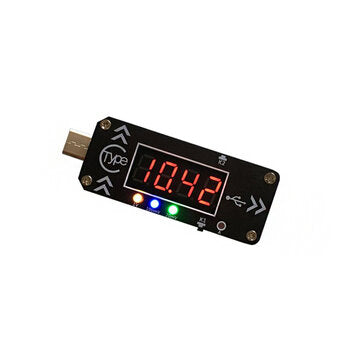
XY-WPDT USB Charging Trigger Charger Voltmeter Ammeter 5V/9V/12V/15V/20V/PPS PD2.0 PD3.0 Type-C USB
XY-WPDT USB Charging Trigger Charger Voltmeter Ammeter 5V/9V/12V/15V/20V/PPS PD2.0 PD3.0 Type-C USB
Regular price
$453.00 USD
Regular price
$755.00 USD
Sale price
$453.00 USD
Unit price
per
Couldn't load pickup availability
Description:
XY-WPDT is a PD-Fast-Charger Trigger. It can make a PD charger becomes DC 4V~20V adjustable power supply module.It supports PD2.0 and PD3.0 protocol.
Features:
- PD-Fast-Charger Trigger - Voltage and current display - Multi-set voltage output - Power-off memory function
Specifications:
Output Voltage:DC 4.0V~20V Voltage Precision:0.3% Voltage Resolution:0.01V Current Precision:0.5% Current Resolution:0.001A Working Temperature range:-20a??~100a?? Working Humidity range:0%-95%RH Size:70*25*9mm
Set Mode:
? ? 1>.Boot display:Automatically detect the PD fast charging protocol every time after power is turned on. ? ? ? ? 1.1>.Input device dona??t support PD protocol if display a??----a??. ? ? ? ? 1.2>.Input device supports PD2.0 protocol. ? ? ? ? 1.3>.Input device support PD3.0 protocol. ? ? 2>.Switch display parameter: ? ? ? ? 2.1>.Short press K1 button to switch display output voltage or output current or both in turns. ? ? ? ? 2.2>.Keep press K1 button about 5second to turn OFF screen and indicator.But XY-WPDT keeps output voltage. ? ? 3>.Adjust voltage grade: ? ? ? ? 3.1>.Short press K2 button to set voltage grade.The corresponding voltage grade indicator will flash automatically. ? ? ? ? 3.2>.Short press K1 or K2 button to change voltage value. K1 is increase and K2 is decrease in this time. ? ? ? ? 3.3>.There are 7 voltage grade P7-1 to P7-7 and P7-L. It will display voltage grade and then display corresponding voltage value. ? ? ? ? 3.4>.Keep press K1 button about 2second to save parameters and exit(Or without any operation within 5second). ? ? ? ? 3.5>.P7-L is the last voltage grade. Module will trigger all grades(5V/9V/12V/15V/PPS-Mode) in turns if selected this grade. Three LED indicator will lit in turns and this mode can be used for factory of charger. ? ? ? ? 3.6>.PD2.0 charger generally supports 4~5 voltage grades so screen will display P4-1 or P5-1. ? ? ? ? 3.7>.PD3.0 charger generally supports 6~7 voltage grades so screen will display P6-1 or P7-1. ? ? ? ? 3.8>.P7-1 output 5V.Yellow/Blue/Green indicator keep OFF. ? ? ? ? 3.9>.P7-2 output 9V.Yellow/Blue/Green indicator keep OFF. ? ? ? ? 3.10>.P7-3 output 12V.Yellow/Blue/Green indicator keep OFF. ? ? ? ? 3.11>.P7-4 output 15V.Yellow/Blue/Green indicator keep OFF. ? ? ? ? 3.12>.P7-5 output 5V.Yellow/Blue/Green indicator keep OFF. ? ? ? ? 3.13>.P7-6 is PPS mode.Yellow/Blue/Green indicator keep ON. ? ? ? ? 3.14>.P7-7 is PPS mode.Yellow/Blue/Green indicator keep ON. ? ? ? ? 3.15>.P7-L is in turns mode. ? ? 4>.Set PPS step voltage: ? ? ? ? 4.1>.Make sure XY-WPDT is working at PPS mode which 1V/100mV/20mV indicator all or anyone lit which is the P7-6 or P7-7 voltage grade. ? ? ? ? 4.2>.Keep press K2 button about 3second to adjust PPS voltage and screen will flashing.First activate the 1V step voltage. ? ? ? ? 4.3>.Keep press K2 button about 3second to select next step voltage. ? ? ? ? 4.4>.Short press K1 or K2 button to change voltage value. K1 is increase and K2 is decrease in this time. ? ? ? ? 4.5>.Short press K1/K2 to exit PPS step voltage set mode and to select others? step voltage when 1V/100mV/20mV indicator both keep ON. ? ? ? ? 4.6>.Keep press K1 button about 2second to save parameters and return to normal display(Or without any operation within 5second).
Application:
? ? 1>.Router ? ? 2>.Optical modem ? ? 3>.Set-top box ? ? 4>.Laptop ? ? 5>.Charger converter ? ? 6>.Charger tester ? ? 7>.Charger factory
Package Included:
1 x XY-WPDT PD-Fast-Charger Trigger Module 1 x 100cm 5.5*2.5mm USB cable 2 x 60*24*2mm Acrylic shell 2 x Black Indicator panel 1 x Mini screwdriver 4 x M2*5mm Copper column 8 x M2*5mm Screw
XY-WPDT is a PD-Fast-Charger Trigger. It can make a PD charger becomes DC 4V~20V adjustable power supply module.It supports PD2.0 and PD3.0 protocol.
Features:
- PD-Fast-Charger Trigger - Voltage and current display - Multi-set voltage output - Power-off memory function
Specifications:
Output Voltage:DC 4.0V~20V Voltage Precision:0.3% Voltage Resolution:0.01V Current Precision:0.5% Current Resolution:0.001A Working Temperature range:-20a??~100a?? Working Humidity range:0%-95%RH Size:70*25*9mm
Set Mode:
? ? 1>.Boot display:Automatically detect the PD fast charging protocol every time after power is turned on. ? ? ? ? 1.1>.Input device dona??t support PD protocol if display a??----a??. ? ? ? ? 1.2>.Input device supports PD2.0 protocol. ? ? ? ? 1.3>.Input device support PD3.0 protocol. ? ? 2>.Switch display parameter: ? ? ? ? 2.1>.Short press K1 button to switch display output voltage or output current or both in turns. ? ? ? ? 2.2>.Keep press K1 button about 5second to turn OFF screen and indicator.But XY-WPDT keeps output voltage. ? ? 3>.Adjust voltage grade: ? ? ? ? 3.1>.Short press K2 button to set voltage grade.The corresponding voltage grade indicator will flash automatically. ? ? ? ? 3.2>.Short press K1 or K2 button to change voltage value. K1 is increase and K2 is decrease in this time. ? ? ? ? 3.3>.There are 7 voltage grade P7-1 to P7-7 and P7-L. It will display voltage grade and then display corresponding voltage value. ? ? ? ? 3.4>.Keep press K1 button about 2second to save parameters and exit(Or without any operation within 5second). ? ? ? ? 3.5>.P7-L is the last voltage grade. Module will trigger all grades(5V/9V/12V/15V/PPS-Mode) in turns if selected this grade. Three LED indicator will lit in turns and this mode can be used for factory of charger. ? ? ? ? 3.6>.PD2.0 charger generally supports 4~5 voltage grades so screen will display P4-1 or P5-1. ? ? ? ? 3.7>.PD3.0 charger generally supports 6~7 voltage grades so screen will display P6-1 or P7-1. ? ? ? ? 3.8>.P7-1 output 5V.Yellow/Blue/Green indicator keep OFF. ? ? ? ? 3.9>.P7-2 output 9V.Yellow/Blue/Green indicator keep OFF. ? ? ? ? 3.10>.P7-3 output 12V.Yellow/Blue/Green indicator keep OFF. ? ? ? ? 3.11>.P7-4 output 15V.Yellow/Blue/Green indicator keep OFF. ? ? ? ? 3.12>.P7-5 output 5V.Yellow/Blue/Green indicator keep OFF. ? ? ? ? 3.13>.P7-6 is PPS mode.Yellow/Blue/Green indicator keep ON. ? ? ? ? 3.14>.P7-7 is PPS mode.Yellow/Blue/Green indicator keep ON. ? ? ? ? 3.15>.P7-L is in turns mode. ? ? 4>.Set PPS step voltage: ? ? ? ? 4.1>.Make sure XY-WPDT is working at PPS mode which 1V/100mV/20mV indicator all or anyone lit which is the P7-6 or P7-7 voltage grade. ? ? ? ? 4.2>.Keep press K2 button about 3second to adjust PPS voltage and screen will flashing.First activate the 1V step voltage. ? ? ? ? 4.3>.Keep press K2 button about 3second to select next step voltage. ? ? ? ? 4.4>.Short press K1 or K2 button to change voltage value. K1 is increase and K2 is decrease in this time. ? ? ? ? 4.5>.Short press K1/K2 to exit PPS step voltage set mode and to select others? step voltage when 1V/100mV/20mV indicator both keep ON. ? ? ? ? 4.6>.Keep press K1 button about 2second to save parameters and return to normal display(Or without any operation within 5second).
Application:
? ? 1>.Router ? ? 2>.Optical modem ? ? 3>.Set-top box ? ? 4>.Laptop ? ? 5>.Charger converter ? ? 6>.Charger tester ? ? 7>.Charger factory
Package Included:
1 x XY-WPDT PD-Fast-Charger Trigger Module 1 x 100cm 5.5*2.5mm USB cable 2 x 60*24*2mm Acrylic shell 2 x Black Indicator panel 1 x Mini screwdriver 4 x M2*5mm Copper column 8 x M2*5mm Screw